Fraud Blocker Hoe DICOM-calibratie uit te voeren met JVC Medivisor Calibratie- en QA Overslaan naar inhoud
Aanmelden
Hoofdmenu

  • uitverkoop

  • Technische bronnen
  • Over Monitors.com
  • Neem contact met ons op
  • Aanmelden
  • EUR €
  • Nederlands
  • Medische Displays
  • Algemene radiologiedisplays
  • Mammografie Displays
  • Displays voor klinische beoordeling
  • Chirurgische weergaven
  • Pathologie Displays
  • Bekijk alle medische displaymonitoren
  • Professionele beeldschermen
  • 4K Monitoren
  • Aanraakschermmonitoren
  • LCD / LED-monitoren
  • Medische beeldschermen per merk
  • Barco
  • Eizo
  • JVC
  • LG
  • NEC
  • Steris
  • Sony
  • Arthrex
  • Ikegami
  • NDS
  • Panasonic
  • WIDE
  • Werkstations per type
  • Desktop werkstations
  • Mobiele werkstations
  • Rack Werkstations
  • Bekijk alle werkstations
  • Werkstations per merk
  • HP Werkplekken
  • Lenovo Werkstations
  • Dell Werkstations
  • Werkstations per processor
  • Intel Xeon Processors
  • Intel Core Processors uit de i-serie
  • AMD ThreadRipper Pro-processors
  • Werkstations op maat
  • Toren
  • Kleine vormfactor (SFF)
  • Ultra Small Form Factor
  • Rack
  • Laptop
  • Modaliteit
  • Algemene Radiologie Leesstations
  • Mammografie leesstations
  • Bekijk alle leesstations
  • Stations lezen op voorwaarde
  • Nieuwe Leestations
  • Vernieuwde leesstations
  • Stations lezen per merk
  • Barco Leestations
  • Eizo Leestations
  • JVC Leesstations
  • LG Leestations
  • NEC Leesstations
  • Grafische Kaart per Merk
  • Barco Videokaarten
  • NVIDIA Grafische kaarten
  • AMD Videokaarten
  • Bekijk alle grafische kaarten
  • Grafische kaart door Memory
  • 4GB
  • 6GB
  • 8GB
  • 12GB
  • 16GB
  • 20GB
  • 24GB
  • 32GB
  • 48GB
  • Dicteermicrofoons per merk
  • Nuance Dikteermicrofoons
  • Philips Dictie microfoons
  • Diktie Microfoons per Type
  • Bedrade dicteermicrofoons
  • Draadloze dicteermicrofoons
  • Headset draadloze dicteermicrofoons
  • Bekijk alle microfoons
  • Microfoon Accessoires
  • Nuance Accessoires
  • Philips Accessoires
  • Bekijk alle microfoonaccessoires
  • Voice Recognition Software and Licenses
  • Voice Recognition Software and Licenses
  • Medische Monitor Accessoires
  • Stroomadapters
  • Kalibratiekits
  • Accessoires voor werkstations
  • Toetsenborden
  • Muizen
  • Wifi Adapters
  • Webcams
  • KVM-schakelaars
  • Basisstations
  • Documentscanners
  • Muismatten & Polssteunen
  • Bril
  • Kabels en adapters
  • Ethernet-kabels en -adapters
  • DVI-kabels en -adapters
  • HDMI-kabels en -adapters
  • USB-kabels en -adapters
  • USB-C-kabels & adapters
  • DisplayPort kabels en adapters
  • Mini DisplayPort Kabels & Adapters
  • Thunderbolt Kabels & Adapters
  • Netsnoeren
  • Andere accessoires
  • UPS back-up batterijen
  • Overspanningsbeveiligers
  • Andere Producten
  • Medische Film Scanners
  • Vidar Digitaliseermachines voor medische films
  • Oplossing voor het scannen van medische filmdocumenten
  • Medical Film Scanning Software
  • Business Class Scanners
  • Hoge-snelheid duplex documentenscanners
Monitors.com Monitors.com Logo

Snelle links

Producten Technische bronnen Over Monitors.com Neem contact met ons op UITVERKOOP

Hoe DICOM-calibratie uit te voeren met JVC Medivisor Calibratie- en QA-software - Win 10 Pro

jun. 22, 2020
How to Perform DICOM Calibration Using JVC Medivisor Calibration and QA Software - Win 10 Pro

Situatie:

U moet een DICOM-calibratie uitvoeren op uw JVC/Totoku medische diagnosemonitors.

Oplossing:

Volg de onderstaande instructies om handmatig een DICOM-calibratie uit te voeren met JVC Medivisor calibratie- en QA-software.

Belangrijk: Zorg ervoor dat een kopie van de JVC Medivisor Agent is geïnstalleerd. Volg deze gids om de JVC Medivisor Agent calibratie- en QA-software te installeren.


Open JVC Medivisor Agent 
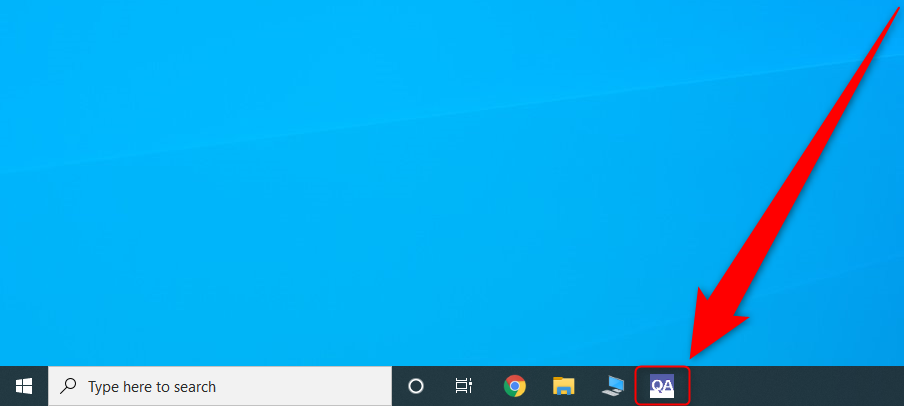
 

Wacht tot JVC Medivisor Agent Software is geladen


Klik op Calibratie

Het wordt aanbevolen om de monitors minstens 60 minuten aan te hebben voordat u kalibreert, zodat de lampen de tijd hebben om op te warmen en de optimale luminantie te bereiken. Als u de calibratie en QA echter meteen wilt uitvoeren, laat dit vakje dan uitgevinkt. Klik Uitvoeren


Klik op OK

Wacht tot Calibratie is voltooid

Klik op OK

Klik op Toon details om het rapport te bekijken. Klik op Rapport opslaan om het rapport op te slaan
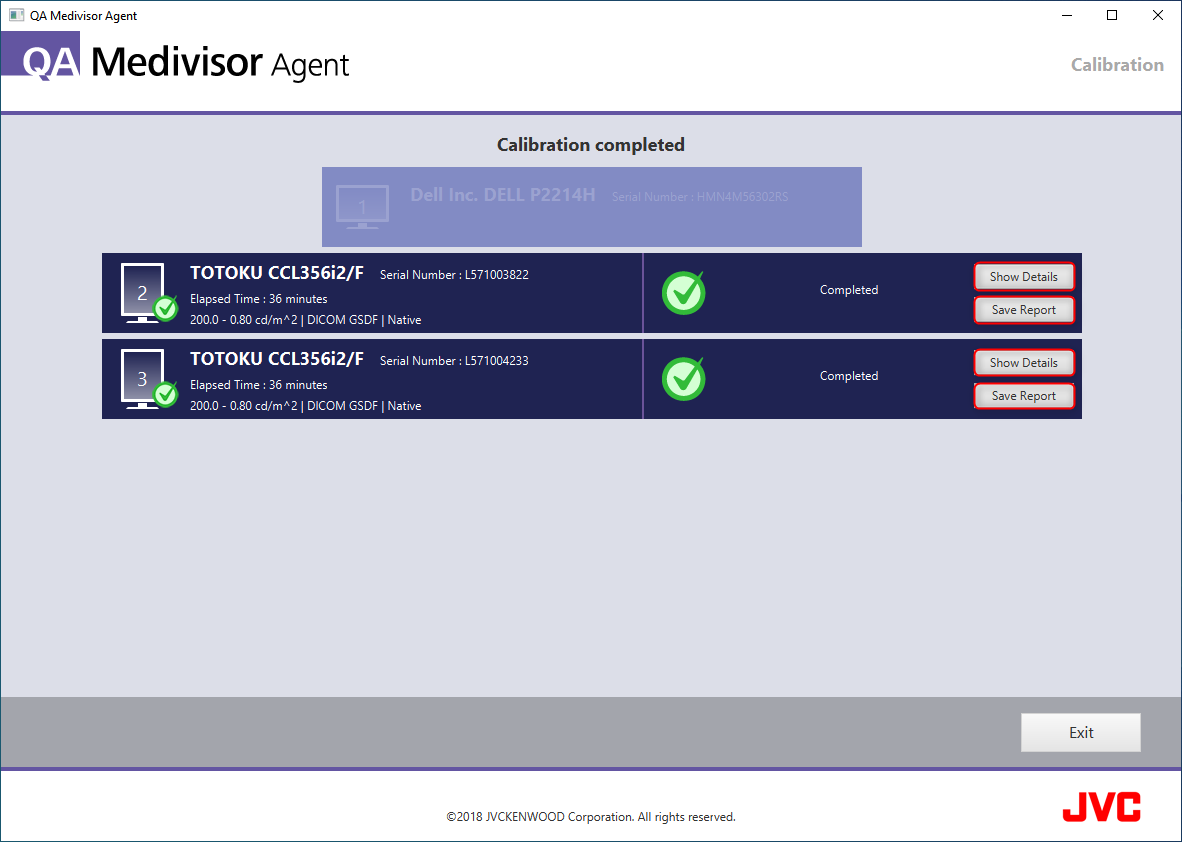
Klik Afsluiten

Conclusie:

Uw monitor(en) worden nu gekalibreerd volgens de DICOM-standaard. Als u wilt configureren JVC Medivisor Agent-applicatie om uw monitoren automatisch volgens een vast schema te kalibreren, volgt u onze gids op  Hoe u automatische DICOM-kalibratie op TOTOKU plant JVC medische beeldschermmonitors met Medivisor Agent - Win 10 Pro.
Share
Vorig artikelVolgende artikel

Laat een reactie achter

Alle opmerkingen worden gemodereerd voordat ze worden gepubliceerd

Word lid

Abonneer u om speciale aanbiedingen en promoties te ontvangen.  

Volg ons

Populaire berichten

  1. 7 Considerations When Choosing a Mammography Display
    7 overwegingen bij het kiezen van een mammografiescherm
    okt. 05, 2020
  2. What are the Advantages of Medical Display Monitors?
    Wat zijn de voordelen van medische beeldschermmonitors?
    mrt. 03, 2021
  3. Why You Need a 5MP (or Higher) Diagnostic Display to Read Mammograms
    Waarom je een nodig hebt 5MP (of hoger) Diagnostisch display om mammogrammen te lezen
    mei 02, 2021

Uitgelichte producten

Redden €1.307
JVC Totoku CL-S300 3MP 21" Color LED General Radiology Diagnostic Display Monitors (CL-S300)
JVC JVC Totoku CL-S300 3MP 21-inch kleuren-LED-monitoren voor algemene radiologiediagnostiek (CL-S300)
GRATIS VERZENDING
Beschikbaar als: Nieuw
Van € 2.613 95
€3.920,95
Kies opties
Redden €3.049 Redden €1.524 Redden €3.049
ribbon-icon
JVC Totoku CL-S500 5MP 21" Color LED Mammo 3D-DBT Breast Imaging Display (CL-S500)
JVC JVC Totoku CL-S500 5MP Mammo 3D-DBT-borstbeeldscherm met kleuren-LED van 21 inch (CL-S500)
GRATIS VERZENDING
Beschikbaar als: Nieuw
Van € 5.662 95
€7.186,95
Kies opties
Monitors.com by Bayland
GSA Logo Dun & Bradstreet Logo
All mammography displays offered by Monitors.com are FDA approved
HIPAA Compliant BBB accredited business
  • Over ons
  • Neem contact met ons op
  • Technische middelen
  • Carrière
  • Klimaatverbintenis
  • Sitemap
  • Vrijwaring
  • Algemene voorwaarden
  • Privacy
  • FAQ

Nieuwsbrief

Schrijf u in om promotionele aanbiedingen te ontvangen!

HIPAA Compliant BBB accredited business

© 2026 Bayland Technologies, Inc.

Volg ons

We accepteren

Ach Direct Debit Amazon American Express Apple Pay Bancontact Diners Club Discover Google Pay iDEAL Wero Mastercard Shop Pay Visa

Gebruik deze balk om informatie over uw cookiebeleid weer te geven.

  • Opent in een nieuw venster.

Je kar is leeg

Compare Products

Sluiten