Fraud Blocker How to Schedule Automatic Calibration in QA Medivisor Agent v1.5.0.56 Skip to content
Sign in
Main Menu

  • sale

  • Technical Resources
  • About Monitors.com
  • Contact Us
  • Sign in
  • CAD $
  • English
  • Medical Displays
  • General Radiology Displays
  • Mammography Displays
  • Clinical Review Displays
  • Surgical Displays
  • Pathology Displays
  • View All Medical Display Monitors
  • Professional Displays
  • 4K Monitors
  • Touch Screen Monitors
  • View All Professional Displays
  • Medical Displays by Brand
  • Barco
  • Eizo
  • JVC
  • LG
  • NEC
  • Steris
  • Sony
  • Arthrex
  • Ikegami
  • NDS
  • Panasonic
  • WIDE
  • Workstations by Type
  • Desktop Workstations
  • Mobile Workstations
  • Rack Workstations
  • View All Workstations
  • Workstations by Brand
  • HP Workstations
  • Lenovo Workstations
  • Dell Workstations
  • Workstations by Processor
  • Intel Xeon Processors
  • Intel Core i-Series Processors
  • AMD ThreadRipper Pro Processors
  • Workstations Form Factors
  • Tower
  • Small Form Factor (SFF)
  • Ultra Small Form Factor
  • Rack
  • Laptop
  • Modality
  • General Radiology Reading Stations
  • Mammography Reading Stations
  • View All Reading Stations
  • Reading Stations by Condition
  • New Reading Stations
  • Renewed Reading Stations
  • Reading Stations by Brand
  • Barco Reading Stations
  • Eizo Reading Stations
  • JVC Reading Stations
  • LG Reading Stations
  • NEC Reading Stations
  • Graphics Card by Brand
  • Barco Graphics Cards
  • NVIDIA Graphics Cards
  • AMD Graphics Cards
  • View All Graphics Cards
  • Graphics Card by Memory
  • 4GB
  • 6GB
  • 8GB
  • 12GB
  • 16GB
  • 20GB
  • 24GB
  • 32GB
  • 48GB
  • Dictation Microphones by Brand
  • Nuance Dictation Mics
  • Philips Diction Mics
  • Dictation Microphones by Type
  • Wired Dictation Mics
  • Wireless Dictation Mics
  • Headset Wireless Dictation Mics
  • View All Microphones
  • Microphone Accessories
  • Nuance Accessories
  • Philips Accessories
  • View All Microphone Accessories
  • Voice Recognition Software and Licenses
  • Voice Recognition Software and Licenses
  • Medical Monitor Accessories
  • Power Adapters
  • Calibration Kits
  • Workstation Accessories
  • Keyboards
  • Mice
  • Wifi Adapters
  • Webcams
  • KVM Switches
  • Docking Stations & Hubs
  • Document Scanners
  • Mouse Pads & Wrist Rests
  • Eyewear
  • Cables and Adapters
  • Ethernet Cables & Adapters
  • DVI Cables & Adapters
  • HDMI Cables & Adapters
  • USB Cables & Adapters
  • USB-C Cables & Adapters
  • DisplayPort Cables & Adapters
  • Mini DisplayPort Cables & Adapters
  • Thunderbolt Cables & Adapters
  • Power Cords
  • UPS Backups & Surge Protectors
  • UPS Backup Batteries
  • Surge Protectors
  • Other Products
  • Medical Film Scanners
  • Vidar Medical Film Digitizers
  • Medical Film Document Scanning Solution
  • Medical Film Scanning Software
  • Business Class Scanners
  • High-Speed Duplex Document Scanners
Monitors.com Monitors.com Logo

Quick Links

Products Technical Resources About Monitors.com Contact Us SALE

How to Schedule Automatic Calibration in QA Medivisor Agent v1.5.0.56 DICOM Calibration and QA Software - Win 10 Pro

Jun 15, 2020
How to Schedule Automatic Calibration in QA Medivisor Agent v1.5.0.56 DICOM Calibration and QA Software - Win 10 Pro

Situation:

You need to configure QA Medivisor Agent v1.5.0.56 DICOM Calibration and QA Software to automatically run DICOM calibrations.

Solution:

Follow the instructions below to configure your QA Medivisor Agent v1.5.0.56 DICOM Calibration and QA Software to run auto DICOM calibrations.


Open QA Medivisor Agent v1.5.0.56 DICOM Calibration and QA Software
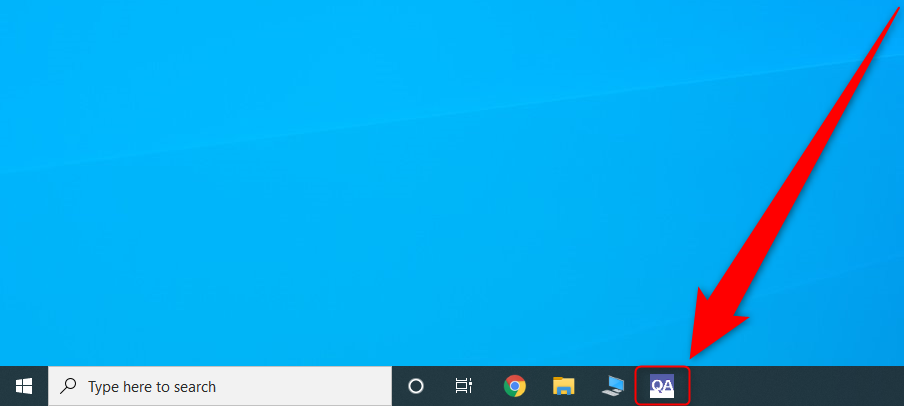
 

Wait for QA Medivisor Agent v1.5.0.56 DICOM Calibration and QA Software to load


Click on the Right Arrow


Click Schedule Tasks


Check Calibration then click Settings


On Type, select One Time, Daily, Weekly, or Custom Plan. In this example, we will walk you through how to set up a Weekly Calibration


On Time, select the time you want the calibration to occur. Please note the time is in a 24-Hour format (Military Time)


On Week, select the day of the week you want the calibration to occur 


Select Autorun (Using Front Sensor) then click OK


Click OK

Conclusion:

QA Medivisor Agent v1.5.0.56 DICOM Calibration and QA Software is now configured to do auto DICOM calibrations so you do not have to worry about it. If you need to view reports of these calibrations please follow our How to view reports in QA Medivisor Agent v1.5.0.56 DICOM Calibration and QA Software - Win 10 Pro guide.
Share
Previous articleNext article

Leave a comment

All comments are moderated before being published

Join Us

Subscribe to get special offers and promotions.   

Follow us

Popular posts

  1. 7 Considerations When Choosing a Mammography Display
    7 Considerations When Choosing a Mammography Display
    Oct 05, 2020
  2. What are the Advantages of Medical Display Monitors?
    What are the Advantages of Medical Display Monitors?
    Mar 03, 2021
  3. Why You Need a 5MP (or Higher) Diagnostic Display to Read Mammograms
    Why You Need a 5MP (or Higher) Diagnostic Display to Read Mammograms
    May 02, 2021

Featured Products

Save $2,098.91
JVC Totoku CL-S300 3MP 21" Color LED General Radiology Diagnostic Display Monitors (CL-S300)
JVC JVC Totoku CL-S300 3MP 21" Color General Radiology Diagnostic Display Monitors (CL-S300)
Free Shipping
Available as: New
From $ 4,197 79 CAD
$6,296.70
Choose Options
Save $4,897.44 Save $2,448.72 Save $4,897.44
ribbon-icon
JVC Totoku CL-S500 5MP 21" Color LED Mammo 3D-DBT Breast Imaging Display (CL-S500)
JVC JVC Totoku CL-S500 5MP 21" Color Mammo 3D-DBT Breast Imaging Display (CL-S500)
Free Shipping
Available as: New
From $ 9,095 23 CAD
$11,543.95
Choose Options
Monitors.com by Bayland
GSA Logo Dun & Bradstreet Logo
All mammography displays offered by Monitors.com are FDA approved
HIPAA Compliant BBB accredited business
  • About Us
  • Contact Us
  • Technical Resources
  • Careers
  • Climate Commitment
  • Sitemap
  • Disclaimer
  • Terms & Conditions
  • Privacy
  • FAQ

Newsletter

Sign up to receive promotional offers!

HIPAA Compliant BBB accredited business

© 2026 Bayland Technologies, Inc.

Follow Us

We Accept

Ach Direct Debit Amazon American Express Apple Pay Bancontact Diners Club Discover Google Pay iDEAL Wero Mastercard Shop Pay Visa

Use this bar to show information about your cookie policy.

  • Opens in a new window.

Your cart is empty

Compare Products

Close